Wyze Breach: Security Incident Alert
· By Robert Beagle · Security Industry & Product News
Updated September 30, 2026
Wyze, the maker of popular and budget-friendly home security cameras, has issued a security alert to its customers regarding a recent breach that exposed some users to unauthorized access to security videos.
The incident originated from a security outage on Friday morning and escalated into a full-fledged security breach. Wyze promptly communicated this to its customers through an email on Monday, stating, “As we worked to bring cameras back online, we experienced a security issue.” Some users reported seeing the wrong thumbnails and Event Videos in their Events tab. We immediately removed access to the Events tab and started an investigation.”
Event videos, capturing movements, vehicles, or sounds, were compromised during this incident. Wyze confirmed that approximately 13,000 users received thumbnails from cameras not belonging to them, with 1,504 users inadvertently tapping on them. While most taps enlarged the thumbnail, in some instances, the breach allowed access to Event Videos. All affected users have been notified, but for now, even CNET has decided to stop recommending Wyze Security Devices.

Common Problems with Wyze Cameras
Despite the straightforward 5-minute installation process and acceptable video quality, the question arises: Is investing $19.99 in a security camera justified considering the drawbacks? Common problems may include:
- Firmware Update Issues:
Firmware updates were reported to cause camera malfunctions, leading to potential bricking. Additionally, users often face the challenge of updating each camera individually, requiring attention on a per-camera level.
- Camera Defects:
Some Wyze camera owners have reported issues with their cameras, such as the camera not turning on when connected to power, the live stream being blurry when night vision is on, and the camera not connecting after a firmware update.
- Connection Outages:
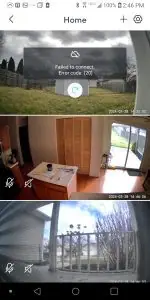
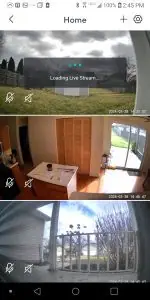
Users experienced disruptions in camera connectivity, impacting the reliability of the security system. This is coupled with the need to restart each camera individually when connection issues arise.
- Unauthorized Live Feeds:
One user reported accessing live feeds from cameras that did not belong to them.
- SD Card Dependency:
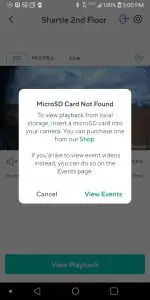
Without an SD card installed, obtaining any video from the past few days is challenging, limiting access to only motion-triggered clips.
- Limited SD Card Compatibility:
Not all Wyze cameras support SD cards, restricting the use of this storage option.
- Playback Restrictions Without SD Card:
Even with a paid account, accessing playback beyond short event clips requires an SD card installed in the camera.
Wyze Responds to the Breach
Wyze, known for its compact and affordable security cameras starting at $19.99, expressed regret over the incident and is committed to rebuilding trust. The cameras are top sellers on Amazon, with over 10,000 units sold monthly. Notably, Wyze’s founders are former Amazon employees.
In response to the breach, Wyze is implementing additional security measures, including a new layer of verification before users can access Event Videos. The company has also modified its system to bypass caching for checks on user-device relationships until thoroughly tested for extreme events.
The email from Wyze states, ‘We know this is very disappointing news. It does not reflect our commitment to protect customers or mirror the other investments and actions we have taken in recent years to make security a top priority at Wyze.
This incident follows concerns raised by ‘Wirecutter,’ the New York Times’ product recommendation service, last fall, prompting a pause in testing and recommendations for Wyze cameras due to security worries. The concerns were initially raised in 2023 when Wyze camera owners could access live video feeds from cameras they didn’t own or recognize.
Customer Testimonial – Wyze Cameras At Mom’s House
While addressing the security breach, real user experiences shed light on the practical challenges users face. One Wyze camera owner shared their perspective, stating, “I’ve got three of these cameras set up at my mom’s place, and it’s become a bit of a routine that, at any given moment, one of the three decides to go offline with that annoying ‘connection lost’ message.” This firsthand account mirrors the common concerns expressed by users, highlighting the reliability issues encountered during crucial moments.
Despite the hiccups, the user continues, “So, you hop into the app, attempting to restart that particular camera. More often than not, though, it stubbornly refuses to cooperate, insisting that the ultimate solution is to physically unplug and plug it back in.” This testimonial encapsulates the frustration users may feel when attempting to troubleshoot camera issues remotely.
Yet, the narrative takes an unexpected turn, providing a glimmer of hope: “The catch? Since the cameras are over at my mom’s, I can’t exactly do the whole unplug-and-plug-back-in dance. But, here’s the kicker: if I give it a few hours and check back, like magic, they’re all connected again.” This firsthand account, though highlighting the quirkiness of the situation, underscores the importance of reliability in a security system.
Professional or Wyze?
Is the security of your business worth the investment in a professional-grade camera system, or does price take precedence, with the belief that at $19.99, you’ve secured a decent system ‘for the money’? The peril lies in the current ease of calculating costs and assigning values to your options, hoping for the right decision.
Remember, if there is a serious incident down the road, and you don’t have the video you need because you chose an inexpensive Wi-Fi camera system, that could be a hard decision to live with.
At the end of the day, prioritizing professionalism when it comes to securing your business is an essential step toward a robust and reliable security system. By opting for trusted companies and expert installation, you not only ensure the effectiveness of your security measures but also gain peace of mind knowing that your business is in capable hands.
The investment in professional expertise pays off in the form of enhanced protection, minimizing potential vulnerabilities. So, make a wise (not Wyze) choice – choose professionalism, safeguard your business, and enjoy the confidence that comes with a secure environment.
Are you ready to equip your business with a holistic approach to security? That’s where CameraSecurityNow.com comes in.
Ask us for a free consultation. Consult with one of our experienced certified technicians today, for free, and you’ll have the opportunity to explain your security goals and budget. Afterward, you’ll have the opportunity for us to come out for a site survey and provide you with suggestions on how to meet your goals and budget.

One of our technicians, led by Johnny Beagle, will assist you every step of the way. We will start by giving you a free site survey, which will help us understand the best possible solution for you. Next, one of our technicians will walk you through what kind of cameras would work best for your business.
To contact Johnny and Camera Security Now directly, call 800-440-1662 or fill out a fast, easy online quote form.
Follow our blog to stay up-to-date with CameraSecurityNow.com and follow us on social media. Join the discussion by commenting below.
Related reading