Logitech’s Alert Security Camera System Receives Mac Support

· By zack duncan · Security Industry & Product News, Recording, Storage & Remote Viewing

Updated November 19, 2012
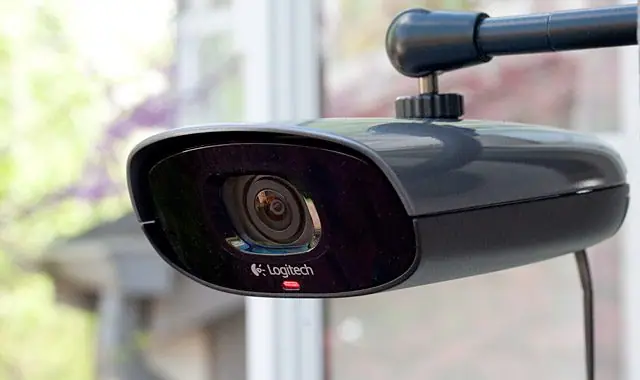
Logitech’s Alert Security Camera System Receives Mac Support

Logitech recently announced that it has extended support for its Alert security camera system to Macs. In addition to that, it announced a new version of the Commander control software that has been developed for OS X. The new app supports viewing live footage from Logitech’s Alert series of HomePlug-enabled cameras as well as recording in HD resolutions while viewpoint controls allow users to digitally pan, tilt and zoom.

There is also motion zoom control. This allows the cameras to trigger recording or send out alerts to your mobile device or email if movement in as many as 16 different spots is detected. Logitech also offers iOS, Android and BlackBerry companion apps that can be used on smartphones and tablets with each app supporting remote viewing.

As many as six cameras can be managed by a single copy of Alert Commander and the internal microSD card in the cameras themselves keeps a local version of any footage gathered, despite whether or not your Mac is powered up or not. Moreover, the app can also be used to transfer and backup all of those local recordings, ensuring you never miss a thing captured by your camera.

If you are already an owner of an Alert camera, then you can download the new Alert Commander for Mac OS X from the Mac App Store right now. If you don’t have an Alert camera then you’ll have to get one before you can utilize these services. The Alert 750e Outdoor Master System starts off at $349.99 while the Alert 750n Indoor Master System costs $299.99. Additional cameras are priced starting at $199.99.

It’s rare to find high grade security software that has been developed for Macs. Most security camera systems are designed for PC users, so it is good to see a broader range of systems that this software can be used on. The addition of an app that works on iOS, Android and BlackBerry devices is also a nice addition.

Source: Slash Gear – Logitech adds Mac support to Alert security camera system
Related posts

Frequently Asked Questions

Common questions from organizations planning commercial surveillance, access control, upgrades, and installation.

What kinds of organizations does Camera Security Now work with?

Camera Security Now supports businesses, schools, healthcare facilities, government organizations, apartment communities, warehouses, manufacturers, regulated environments, and other commercial properties.

Does Camera Security Now provide security camera installation?

Yes. Camera Security Now supports commercial projects with consultation, system planning, equipment selection, installation coordination, configuration, testing, and related project services. Licensing and installation arrangements may vary by state.

Can Camera Security Now help select the right camera system?

Yes. We help buyers evaluate camera coverage, image quality, lighting, analytics, storage, remote viewing, networking, environmental requirements, and future expansion.

Do you offer access control as well as security cameras?

Yes. Camera Security Now helps organizations evaluate commercial video surveillance and access control technologies, including controlled doors, cards, mobile credentials, visitor workflows, intercoms, and integrated platforms.

Do you work with multi-location businesses and organizations?

Yes. Multi-location projects may include centralized video management, remote viewing, common equipment standards, user administration, storage planning, access control, and coordinated deployment.

Can you upgrade an existing commercial surveillance system?

Yes. Existing systems can often be expanded or modernized with updated cameras, recording equipment, storage, networking, analytics, remote access, or access control. Compatibility depends on the equipment and infrastructure already installed.

Ready to Plan Your Commercial Security Project?

Tell us about your property, existing equipment, coverage concerns, analytics goals, access control needs, and installation requirements. We’ll help you define the next practical step.